When a customer calls, you already know.
upfour (up4 for short) checks websites every 10 seconds and raises the alarm when one goes down. So you or an agent can react before visitors leave.

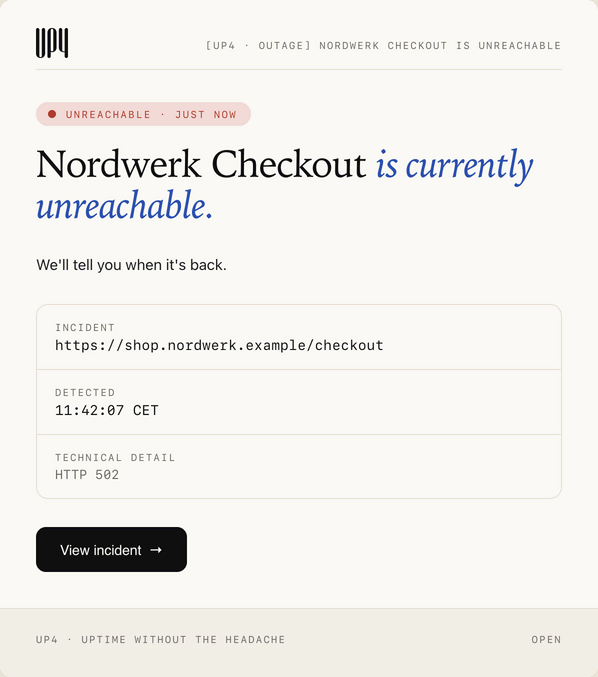
upfour alerts you where your team already works.
- Slack
- Microsoft Teams
- SMS
- Phone call
- PagerDuty
- Discord
- Telegram
- Webhook
- Zapier
- Datadog
- New Relic
- Jira
- Grafana
- ntfy
- Pushover
Three steps to start
- 01
Add a website
Paste an address and choose how often upfour should check. See the estimated cost before saving.
- 02
Choose and test a recipient
Choose who receives outage alerts. Send a test message and check that it arrives.
- 03
Review results and respond
See the first check result, respond to outages and share a report with your client when needed.

For public websites built with WordPress, Webflow, Shopify, Shopware or TYPO3: HTTP checks need no plugin. An additional keyword check can detect missing content. This does not test a complete checkout, page layout or your backups.
Follow the getting started guideWhat your clients see on the status page
Each cell is a day. Cells and status follow your checks on their own, without anyone keeping them up to date.

- In your client’s nameWith their logo and, if you like, on their own domain.
- A range to chooseYou set how far back the page goes, and visitors can switch within it.
- Subscribe instead of askingYour status updates reach subscribers by email, webhook or RSS.
An example: from an outage to a client report
The website lakeside-bakery.com stops responding.check failed
A check fails. upfour checks again before confirming an outage.
Anna receives an email. She looks after the website.example alert
Your recipient and alert plan control delivery. These timings are an example, not a promise.
Anna reviews the incident and fixes the cause.in progress
The incident history shows failed checks and the notifications already sent.
The website responds again.responding
upfour checks the recovery. The recovery notice depends on the monitor settings.
Anna shares a report with her client.
The outage and its history are documented. Reports can use your logo and a delivery schedule.
You choose how often we check.
Set per monitor, from 10 seconds. The 10-second interval is available on every plan.
A five-minute outage gets 30 checks at a 10-second interval and one at 5 minutes. Confirmation, response times and alert settings add time before the alert arrives.

See where it gets slow, and why.
upfour checks from up to four regions and draws each as its own line. Point at a moment and you see which part of the request took the time.

- One line per regionWhen only Australia slows down, it does not disappear into an average.
- Every request in its partsName lookup, connection, TLS handshake, server response and download, on the same scale for every region.
- From 30 days to the last hourDrag across a stretch of the chart and upfour zooms in.
Client areas and reports in your name
Organize websites by client. Client areas (Clients in the app) group monitors, incidents, status pages and reports. You choose separately which data a client sees.
Share by link. A client sees the uptime of their own websites through a read-only link. No account or seat is needed.
White-label reports. Schedule a monthly SLA PDF for each client with your logo. Its share link runs on your verified agency domain; clients open and download the report without a login.
Client areas and reports are available on smaller plans too.

What upfour costs
You pay for what you use, from €3 a month. Your whole team joins at no extra cost, and every plan checks down to every 10 seconds. Every monitor shows its cost before you create it.
Prefer one predictable line on the invoice? Take a flat plan; the check budget is included.
Pay as you go
no monitor cap after top-up · 10 s checks · live cost preview
Team
100 monitors, up to 1,100 with packs · unlimited users · scheduled reports
Agency
500 monitors, up to 1,500 with packs · client areas · white-label reports
Every account starts with €9 starting credit and the core features, including client areas. All prices net.
What to know before you start
● German core infrastructure
The application and primary database run in Germany, in ISO 27001 certified data centres. Our privacy policy names the other providers and international data paths. We run server-side statistics on our own infrastructure. How upfour is operated
● We publish our probes
Fixed egress IPs, a clearly named user agent, and a status page that doesn’t run on the infrastructure it reports on. The current list
● Secrets are encrypted, sessions are revocable
Channel credentials are AES-256-GCM encrypted before storage; browser sessions are opaque tokens whose hash is all we keep. You can revoke any of them, from any device.
● We don’t fear the competition
You can export your monitors as a CSV file at any time, and reports as PDF or Excel too. The upfour import reads the monitor file back in. Export your data
● Straight to the upfour team
The team that builds and runs upfour also answers support. Your question goes straight to them, and you usually get an answer within a day. Contact us
● No free plan, but a starting credit
€9 starting credit, no card, core features included. With light use it lasts about three months; heavier use ends it sooner. How it is calculated
- Name a monitor as you enter its address
- See where a monitor test alert will go
- Copy the facts of an incident for a handover